What is sudo and Its Benefits in Linux? | Lavatech Technology
When someone starts learning Linux, one command seems to appear in every chapter, every tutorial, and every practical session — sudo.
In any Linux or DevOps class, you will often hear your trainer say: “Run this command with sudo.”
But what exactly does sudo mean? Why do Linux professionals rely on it so much?
If you are a beginner, this blog by Lavatech Technology will help you understand sudo in the simplest way — no confusing technical language, only clear explanations.
For more information, visit: lavatechtechnology.com
What is sudo in Linux? (Explained in Very Simple Words)
Linux is one of the most secure operating systems in the world.
To keep the system safe, Linux separates users into two main types:
Normal Users – Limited access, cannot modify the system.
Root User – Full system control, can install, delete, and change anything.
The root user is extremely powerful — and that power can be dangerous if given to everyone.
This is where sudo becomes important.
sudo = “superuser do”
The sudo command allows a normal user to temporarily perform actions that require admin permissions without logging in as the root user.
Easy Example (Non-Technical)
Imagine your house has a master key.
You do not want to give that key to everyone because it opens all rooms.
But sometimes, you may allow a person to enter only one room for a specific job — not the entire house.
That temporary access to one room is exactly what sudo does in Linux.
It gives controlled, limited, and safe access to system-level operations.
Why is sudo Important? (Beginner-Friendly Benefits)
Sudo is more than just a command — it is the backbone of secure Linux usage.
Here are the biggest benefits explained in simple words.
1. Better Security for the Entire System
If everyone logs in as the root user, one wrong command can completely break the system.
With sudo:
Only selected users get special permissions
Users cannot harm the full system
Access is controlled and monitored
This creates a safer working environment for everyone.
2. Protects the System from Accidental Mistakes
Even expert Linux users sometimes type the wrong command.
If executed as root, a mistake like:
With sudo:
The system asks for confirmation
It logs what you executed
It prevents permanent damage
Sudo adds a safety layer between you and a dangerous command.
3. No Need to Share the Root Password
The root password is like the master key for the entire system.
Sharing it with multiple users is risky.
With sudo:
Users use their own password
Admin controls who can run what
The root password stays private
You can remove access anytime
This makes system administration much more secure and easy.
4. Perfect for Teamwork in IT Companies
In a company environment, dozens of users may work on the same server — developers, DevOps engineers, testers, and administrators.
Sudo helps organizations to:
Limit permissions
Track which user ran which command
Control access for teams
Follow security and audit policies
This makes teamwork more structured and professional.
5. We Can Give Command-Specific Access (Very Important Feature)
One of the strongest features of sudo is granular control.
You can allow a user to run only specific commands, instead of giving full admin access.
Examples:
A developer can restart only one service
A DevOps engineer can run only Docker commands
A support team member can check logs but cannot install software
This allows companies to maintain:
High security
Proper workflow
No misuse of admin privileges
This is widely used in DevOps, cloud, and Linux administration.
Basic Diagram: How sudo Works
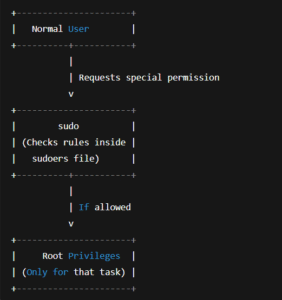
This simple diagram shows that sudo acts like a gatekeeper between a user and the root-level command.
Conclusion
The sudo command is small, but its purpose is huge.
It protects the Linux system, reduces risks, supports teamwork, and ensures that users get only the access they truly need.
At Lavatech Technology, we train students to use sudo effectively because it is the foundation of secure Linux and DevOps administration.
If you understand sudo clearly, your entire Linux journey becomes safer, smoother, and more confident.
For more information, visit: lavatechtechnology.com
Call us: +91 96073 31234